

Create dialogue fills easily using a blend of granular and convolution methods
Undertone Lite gives you a quick and easy way to create dialogue fills from samples or existing audio. With easy integration (VST/AU/AAX/AudioSuite) and two resynthesis methods.

Need More Power? Upgrade to Undertone 2
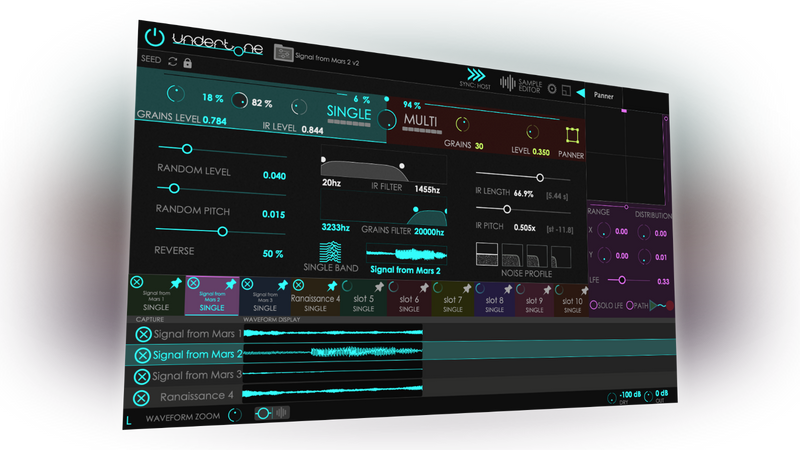
Undertone 2 adds the Multi-sample engine with up to 10 samples and 50 grains, surround sound creation, probability triggering, the Panner, Multiband mode, and 200+ additional presets.
Undertone 2 vs Undertone Lite
Choose the right version for your workflow.
| Feature | Undertone Lite | Undertone 2 |
|---|---|---|
| General | ||
| 100+ included presets and starting points | ✓ | ✓ |
| 100+ more included presets and drones | - | ✓ |
| Sample Editor for trimming | ✓ | ✓ |
| AI autoselection for speechless audio | - | ✓ |
| Resizable UI | ✓ | ✓ |
| Drag and drop | ✓ | ✓ |
| Dry mix and Output controls | ✓ | ✓ |
| History (AudioSuite) | - | ✓ |
| Synthesis | ||
| Single-sample convolution and granular | ✓ | ✓ |
| Multi-sample granular (up to 10 samples) | - | ✓ |
| Random Pitch/Level/Reverse | ✓ | ✓ |
| IR Length and Pitch controls | ✓ | ✓ |
| Filter | ✓ | ✓ |
| Noise profile | ✓ | ✓ |
| Surround (mono to 7.1) | - | ✓ |
| Probability controls | - | ✓ |
| Panner animation | - | ✓ |
| Multiband mode | - | ✓ |
| Support | ||
| 7.1 surround | - | ✓ |
| VST3, AU, AAX, AudioSuite | ✓ | ✓ |
| Automation | ✓ | ✓ |
| AudioSuite import/render | ✓ | ✓ |
| Accessibility | ✓ | ✓ |
| macOS and Windows | ✓ | ✓ |
Minimum Requirements
- Mac OS 10.12 or greater, Universal Binaries (Intel and Apple Silicon natively supported)
- Windows 8 or greater (Windows 10 recommended)
- Pro Tools 12 or greater
- Any DAW supporting VST3 or Audio Unit plugin standard. All plugin formats in 64-bit only.
- Copy protection is provided by PACE Anti-Piracy
- Requires an ilok.com account and an iLok dongle
Start Creating Better Dialogue Fill
Professional dialogue fill at an accessible price.